
Feature-First Architecture#
I wrote about development methodology before (Applying Riverpod Architecture to Flutter), but I hadn't created a detailed example. I wanted to organize the order you build things using Feature-First architecture and how to use Riverpod, partly so I can revisit this whenever I forget!
Feature-First Architecture is an approach where you design and develop software systems with Features at the center. In other words, you define the features to provide to users first, and consider the technical details later. As any book will tell you, project activities proceed in the order: planning -> analysis -> design -> coding -> testing. There's no single right way to do development architecture. It varies by team and by personal preference. I'm trying to use this architecture, but it could change or I might adopt a different approach as I go.
What I felt after actually applying it is that it's very similar to the backend MVC pattern, but the controller part in the presentation layer was a bit different.
Terminology#
Before building based on the architecture, let me organize the things you need to know first, then we'll create the example.
First, let's understand Feature and Domain.
- Feature: Refers to a specific function or service provided to users. For example, an online shopping mall's 'add to cart' function, or a social media 'write comment' function. Features represent system functions from the user's perspective.
- Domain: Refers to the specific area or problem space the system deals with. For example, an online shopping mall's Domain could be 'products', 'orders', 'payments', etc. The Domain handles the system's internal logic and rules.
Simply put, a Feature is a function that users directly see, and a Domain is the internal models and rules that implement that function.
In my project folder structure, a folder is created based on each feature, along with related folders and files. My project has a lib/src/features/feature1/domain folder. The domain folder here serves the same purpose as the domain definition above, while also acting as Models or Entities.
What to Decide Before Starting Development#
Whenever you build a feature, the planning phase should define what features the service has before development begins. What role this feature plays and what the requirements are should be defined.
Once the developer has defined the requirements (or someone else has organized them), the developer just needs to understand the use cases and user flows to determine what data is needed and how it will be stored in the DB. However, since Flutter typically isn't responsible for storing data in a DB, I think of the domain as the shape of validated data sent via API calls for DB storage, and the object that receives data when fetched via APIs (after calling fromJson).
Let me dig a bit deeper into use cases and user flows. Actually, these two aren't really things the developer should define. The developer just needs to turn the requirements into code.
Use case#
- A series of defined actions that a user performs to achieve their goal using the service (=system).
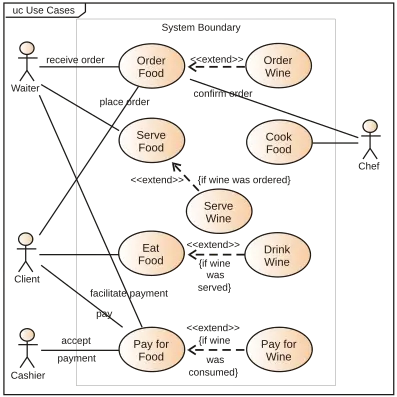
Use case definition#
- Actor: Who uses this function? (user, admin, etc.)
- Goal: What does the user want to achieve through this function?
- Preconditions: What are the prerequisites for using the function?
- Steps: What are the steps to perform the function?
- Result: What outcome occurs after performing the function?
- Exceptions: What are the expected exception scenarios?
User flow#
- A step-by-step visualization of the process a user goes through interacting with the system to achieve a specific goal
- In other words, it shows what order the user goes through which screens to accomplish the goal
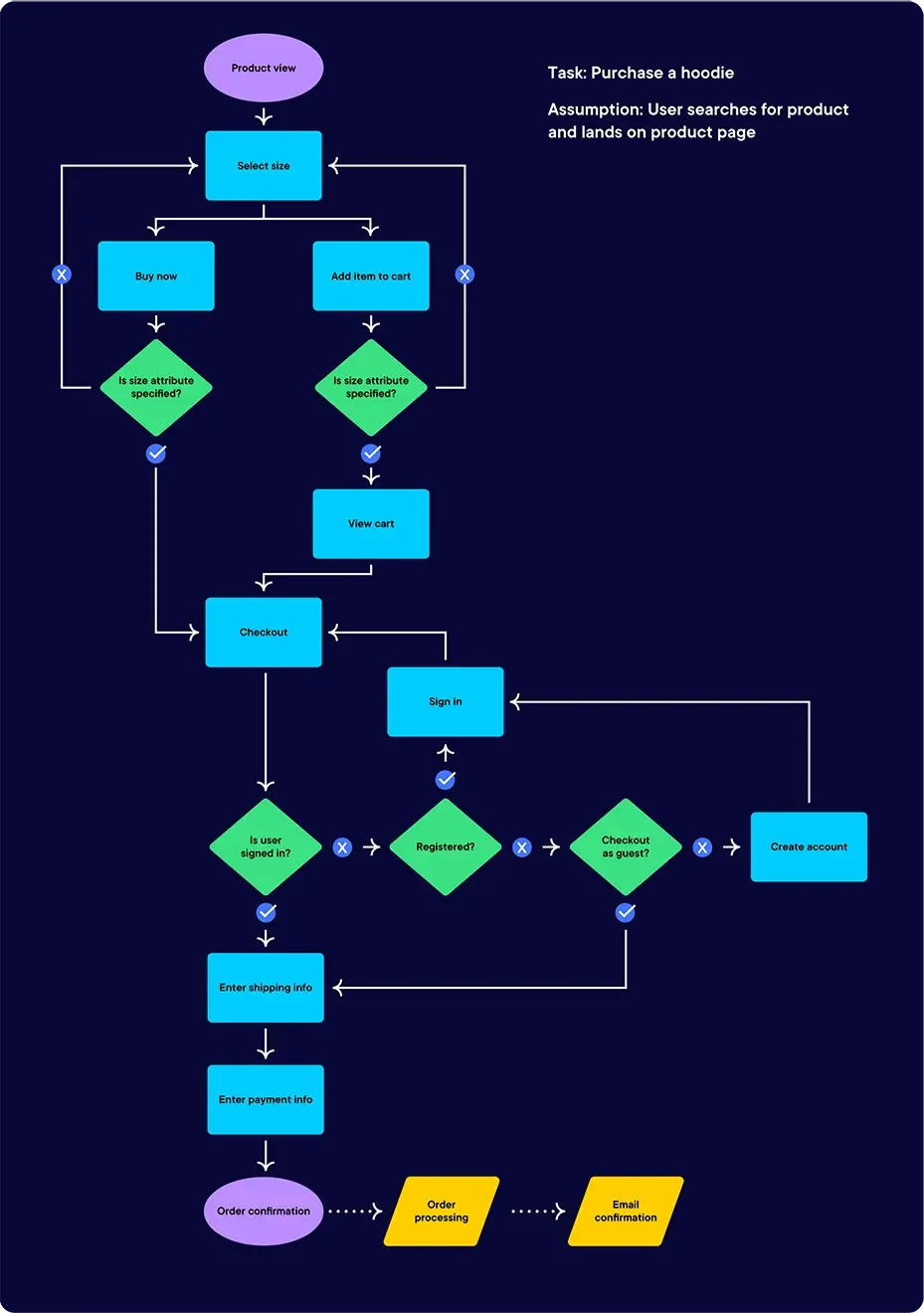
User flow definition#
- Starting point: Where does the user start?
- Steps: What steps does the user go through to achieve the goal? Specify the user's actions and the system's responses at each step.
- Result: What final outcome does the user get?
- Alternative paths: What paths does the user take if they make different choices?
Usage example#
use case: Purchasing a product in an online shopping mall
- Actor: General user
- Goal: Purchase and pay for a desired product
- Preconditions: Sign up, search for products
- Steps: View product detail page, add to cart, enter payment info, complete order
- Result: Order completion message, ability to check order history
- Exceptions: Out of stock, payment failure
user flow:
- User enters a keyword in the product search bar and clicks the search button
- Selects a desired product from the search results page and navigates to the detail page
- Checks the product info on the detail page and adds it to the cart
- Confirms the products to purchase on the cart page and clicks the checkout button
- Enters payment information and completes the payment
- An order completion message is displayed and the user is redirected to the order history page
This is how you define a feature, even if it's not perfect, and then design and develop it. However, in Feature-First architecture, there's also an approach where you create separate entities and usecases folders in the domain area.
In that case, the usecase handles business logic. It implements rules and algorithms for user actions like placing orders or signing up. Implementing rules and algorithms means things like handling user login or fetching specific posts. This is similar to what the service layer does.
In some examples I've seen, they create a usecases folder and make one file per function handled within a screen, but I decided to handle these in the controller or service layer instead.
Order of Developing a Single Feature#
Now here's the part I really wanted to write about. I'm building a feature where one user creates data with multiple metadata (title, dates, time slots) for an appointment so everyone can vote on the times that work for them. It might seem like one feature, but from the app's perspective, it's not. It's a collection of multiple features. In the user flow, pressing "create appointment time" takes you through multiple screens to enter a title, select dates, choose time slots, and hit create. Then there's sharing a URL for voting, voting on appointment times, and viewing the vote results — multiple features altogether.
In Feature-First architecture, a feature means a complete goal that a user wants to achieve using the service.
This is different from what developers typically think of as a function (event, method).
So how should you start developing a feature? From a frontend perspective, I always struggled with what to build first. If the UI designs are ready, making the UI first seems fine, but I questioned whether that was the best approach.
There's really no right answer here. But the answer from Kim Young-han, former CTO of Woowa Brothers, might help with this dilemma.
There's really no definitive answer to this.
In some cases, starting with the UI is better, and in other cases, writing the backend logic first is better. Especially when web frontend developers and server developers are completely separate, each proceeds simultaneously and then combines their work. In such cases, UI and backend logic should be able to be developed simultaneously.
That's why requirements analysis and design are actually what matter most. If you properly analyze requirements, design them, and clearly spec out how each feature should work and what data flows through it, you can proceed from either direction.
I personally prefer to start with core business features from the backend.
Thank you^^
I'm also going to try building business features first. And if I were to start with the UI, I'd expect scenarios like this:
- After building the entire UI, there'll be cases where you need button events or fetching data lists to display on screen <- you'll need to add APIs or state management later and re-verify
- After building the entire UI, if you then create controllers or services, you'll inevitably need to inject or reference repositories or models, so testing the controller requires the rest to be built first
These are somewhat forced examples, so these issues don't necessarily always occur. But when the UI depends on certain objects, errors might persist throughout development until those dependencies are resolved. Also, if you're considering the UI when building other layers, you might end up creating strong dependencies because you don't want to change the UI code.
I'm going to start with the domain since I have the feature requirements. For this example, I'll use a feature for voting on appointment times with friends.
For most things I'll use Riverpod, but except for the controller layer, I'll use singletons that get injected automatically rather than being created directly on the screen.
I removed the imports from the code, so if you copy it directly, you'll get errors. Pay close attention to the error messages in VS Code!
Domain Layer Implementation#
Define the main entities (=models) corresponding to Entities. Since this is for time voting, I initially thought of the feature name "voting" but then decided it's a scheduling-related service, so I created a lib/src/features/calendar folder. Even if you create the feature incorrectly or in the wrong location, you can just rename files later, so I tried not to worry about it too much. For the entity name, since there's a service called When2meet, I'll create the file features/calendar/domain/when_to_meet.dart.
If you look at the code, I'm using a code generator, so the part declarations are included.
Please runflutter pub run build_runner watchbefore developing.
I use the Build Runner extension in VS Code for convenience.
part 'when_to_meet.freezed.dart';
part 'when_to_meet.g.dart';

typedef WhenToMeetID = String;

/// WhenToMeet is a class used for scheduling appointment times.
@freezed
class WhenToMeet with _$WhenToMeet {
  const factory WhenToMeet({
    required WhenToMeetID id,
    required String title,
    required UserID creator,
    required List<User> invitees,
    required List<AnonymousUser> attendees,
    required Map<DateTime, Set<TimeSlot>> availableTimes,
    required Map<UserID, Map<DateTime, Set<TimeSlot>>> selectedTimes,
  }) = _WhenToMeet;

  factory WhenToMeet.fromJson(Map<String, dynamic> json) => _WhenToMeet.fromJson(json);

  factory WhenToMeet.empty() => WhenToMeet(
        id: const UuidV4().generate(),
        title: '',
        creator: '',
        invitees: [],
        attendees: [],
        availableTimes: {},
        selectedTimes: {},
      );

  factory WhenToMeet.fromCreationState(String title, Map<DateTime, Set<TimeSlot>> availableTimes) => WhenToMeet(
        id: const UuidV4().generate(),
        title: title,
        creator: '',
        invitees: [],
        attendees: [],
        availableTimes: availableTimes,
        selectedTimes: {},
      );
}
The static function empty was created for testing, and fromCreationState is an initialization function for WhenToMeetCreationState in the WhenToMeetCreationController in the Presentation layer.
Data Layer Implementation#
The data layer handles CRUD operations from local or remote sources. Each entity may need different CRUD operations, but this time I'll abstract all of them. Using VS Code snippets for this part would be convenient.
// Create as features/calendar/data/when_to_meet_repository.dart
abstract class WhenToMeetRepository {
  Future<List<WhenToMeet>> getWhenToMeets();
  Future<void> addWhenToMeet(WhenToMeet whenToMeet);
  Future<void> deleteWhenToMeet(WhenToMeet whenToMeet);
  Future<void> updateWhenToMeet(WhenToMeet whenToMeet);
}
Now let's create the concrete implementation. Since I'm using Firestore, I'll create it with a similar name like:
- remote_when_to_meet_repository.dart
- firebase_when_to_meet_repository.dart
Inside the Repository, data is manipulated externally through FirebaseFirestore. So we'll inject this from outside. Rather than directly creating RemoteWhenToMeetRepository where it's used, we'll receive it through a provider. This way, we pass and receive objects responsible for necessary layers through Riverpod.
part 'remote_when_to_meet_repository.g.dart';

class RemoteWhenToMeetRepository implements WhenToMeetRepository {
  const RemoteWhenToMeetRepository(this._fs);
  final FirebaseFirestore _fs;

  CollectionReference get _whenToMeetCollection => _fs.collection('when_to_meet');

  @override
  Future<void> addWhenToMeet(WhenToMeet whenToMeet) {
    return _whenToMeetCollection.doc(whenToMeet.id).set(whenToMeet.toJson());
  }

  @override
  Future<void> deleteWhenToMeet(WhenToMeet whenToMeet) {
    return _whenToMeetCollection.doc(whenToMeet.id).delete();
  }

  @override
  Future<List<WhenToMeet>> getWhenToMeets() {
    return _whenToMeetCollection.get().then((snapshot) {
      return snapshot.docs.map((doc) {
        return WhenToMeet.fromJson(doc.data() as Map<String, dynamic>);
      }).toList();
    });
  }

  @override
  Future<void> updateWhenToMeet(WhenToMeet whenToMeet) {
    return _whenToMeetCollection.doc(whenToMeet.id).update(whenToMeet.toJson());
  }
}

@riverpod
WhenToMeetRepository whenToMeetRepository(WhenToMeetRepositoryRef ref) {
  return RemoteWhenToMeetRepository(fs: ref.watch(firebaseFirestoreProvider));
}
Unless there's a very special situation, please use ref.watch instead of ref.read when creating providers like whenToMeetRepositoryProvider.
For testing, you can create a FakeWhenToMeetRepository with arbitrary values set in each function.
firebaseFirestoreProvider was created in lib/src/common/providers/general_providers.dart. But since this is already used as a global variable, it's not strictly necessary.
part 'general_provider.g.dart';

@riverpod
FirebaseFirestore firebaseFirestore(FirebaseFirestoreRef ref) {
  return FirebaseFirestore.instance;
}
Application Implementation#
Now it's time to create the WhenToMeetService. This service handles business logic.
part 'when_to_meet_service.g.dart';

class WhenToMeetService {
  WhenToMeetService({
    required this.remoteWhenToMeetRepository,
  });
  final RemoteWhenToMeetRepository remoteWhenToMeetRepository;

  Future<void> addWhenToMeet(WhenToMeet whenToMeet) {
    return remoteWhenToMeetRepository.addWhenToMeet(whenToMeet);
  }

  Future<List<WhenToMeet>> fetchWhenToMeets(User user) {
    return remoteWhenToMeetRepository.getWhenToMeets(user.id);
  }

  Future<WhenToMeet?> fetchWhenToMeet(WhenToMeetID id) {
    return remoteWhenToMeetRepository.getWhenToMeet(id);
  }

  Future<void> updateWhenToMeet(WhenToMeet whenToMeet) {
    return remoteWhenToMeetRepository.updateWhenToMeet(whenToMeet);
  }
}

@riverpod
WhenToMeetService whenToMeetService(WhenToMeetServiceRef ref) {
  return WhenToMeetService(
    remoteWhenToMeetRepository: ref.watch(remoteWhenToMeetRepositoryProvider),
  );
}
The service adds, updates data, and retrieves individual data. I was tempted to name functions similar to the repository, but it's better to give them meaningful names. Normally there'd be more functions — like fetching the list of things a logged-in user created or participated in — but I'll keep it simple for now. I haven't added any special processing yet, but if needed, you could add processing inside the service functions.
Presentation Implementation#
Now I'll create the Screen and Controller. I think Screens and Controllers might need to be different per platform. Depending on mobile, tablet, or desktop screens, the UI will differ, and if the UI differs, even if the data being processed is the same, the number of Screens and their Controllers will differ depending on whether data is processed all at once or collected one by one through screen transitions.
This time I'll only build for mobile. I need at least 3 screens for title input, date selection, and time slot selection, but since the post would get extremely long, I'll only show the first screen. The _pages variable performs title input, date selection, and time slot selection in order. Receiving data from the variables used here is handled by the Controller.
class WhenToMeetCreationPage extends ConsumerWidget {
  const WhenToMeetCreationPage({super.key});

  final List<Widget> _pages = const [
    WhenToMeetCreationTitlePage(),
    WhenToMeetCreationDatePage(),
    WhenToMeetCreationTimePage(),
  ];

  @override
  Widget build(BuildContext context, WidgetRef ref) {
    final controller = ref.read(whenToMeetCreationControllerProvider.notifier);
    final state = ref.watch(whenToMeetCreationControllerProvider);

    return GestureDetector(
      onTap: () => FocusScope.of(context).unfocus(),
      child: Scaffold(
        appBar: AppBar(
          title: const Text('Create Appointment'),
          leading: controller.isFirstStep()
              ? null
              : IconButton(
                  icon: const Icon(Icons.arrow_back),
                  onPressed: () => controller.previousStep(),
                ),
        ),
        body: SafeArea(
          child: Column(
            children: [
              Padding(
                padding: const EdgeInsets.symmetric(horizontal: pg),
                child: StepProgressIndicator(stepProgress: state.stepProgress),
              ),
              const SizedBox(height: pg * 2),
              Expanded(child: _pages[state.stepProgress.step]),
            ],
          ),
        ),
      ),
    );
  }
}
Controller Explanation#
Functions written in the Controller mainly receive validated input data, deliver data when widgets are rendered, or pass data through events like button clicks.
The Controller was actually the most confusing and thought-provoking part of this architecture. At first, I felt compelled to use domain objects when creating NotifierProviders with Riverpod. But as I iterated, I realized I didn't need to fill an empty domain object with data one field at a time from the screen. It was sufficient to create the domain object just before passing it to the service. Until it gets passed to the service, keeping data in the most convenient form made development more enjoyable for me too.
So I created a class for the Controller. You don't necessarily need to use freezed.
The WhenToMeetCreationState file is the return value of WhenToMeetCreationController's build function.
Looking at this class's variables, you can see it holds the variables used in the appointment creation screen: title, dates, and selectedTimes. These 3 variables get filled in each time the user makes a selection. I put WhenToMeetCreationState in the same file as WhenToMeetCreationController. You could separate them into two files, but I kept them together for convenience.
part 'when_to_meet_creation_controller.freezed.dart';
part 'when_to_meet_creation_controller.g.dart';

@freezed
class WhenToMeetCreationState with _$WhenToMeetCreationState {
  const factory WhenToMeetCreationState({
    required String title,
    required List<DateTime> dates,
    required List<int> selectedTimes,
    required List<TimeSlot> availableTimes,
    required StepProgress stepProgress,
  }) = _WhenToMeetCreationState;

  factory WhenToMeetCreationState.empty() {
    return WhenToMeetCreationState(
      title: '',
      dates: [],
      selectedTimes: [],
      availableTimes: [],
      stepProgress: StepProgress(step: 0, initialStep: 0, totalSteps: 3),
    );
  }
}

extension WhenToMeetCreationStateX on WhenToMeetCreationState {
  WhenToMeet toDomain() {
    final availableTimesMap =
        Map<DateTime, Set<TimeSlot>>.fromEntries(dates.map((date) => MapEntry(date, Set.from(availableTimes))));
    return WhenToMeet.fromCreationState(title, availableTimesMap);
  }
}
StepProgress is a value that tells you which step you're on when navigating screens, but it doesn't seem very important for explaining the architecture, so I'll skip it.
WhenToMeetCreationController has several functions. Some are called when entering a title, selecting dates, or choosing time slots, and there's also a function that's called every time an input field value changes. When saving at the end, it calls createWhenToMeet to save to Firestore.
@riverpod
class WhenToMeetCreationController extends _$WhenToMeetCreationController {
  @override
  WhenToMeetCreationState build() {
    ref.onDispose(() => print('WhenToMeetCreationController disposed'));
    print('WhenToMeetCreationController created');
    // Using a State instead of the Domain directly as the return value works better. But I've already built it this way, so let's just go with it.
    return WhenToMeetCreationState.empty();
  }

  Future<WhenToMeet> createWhenToMeet(List<TimeSlot> slots) async {
    state = state.copyWith(availableTimes: slots);
    final service = ref.read(whenToMeetServiceProvider);
    final whenToMeet = state.toDomain();
    await service.addWhenToMeet(whenToMeet);
    return whenToMeet;
  }

  void previousStep() {
    if (state.stepProgress.isFirstStep()) {
      return;
    }
    state = state.copyWith(stepProgress: state.stepProgress.previousStep());
  }

  void nextStep() {
    if (state.stepProgress.isLastStep()) {
      return;
    }
    state = state.copyWith(stepProgress: state.stepProgress.nextStep());
  }

  // Title input
  void updateTitle(String title) {
    state = state.copyWith(title: title);
    nextStep();
  }

  // Date input
  void updateDates(List<DateTime> dates) {
    if (state.title.isEmpty) {
      assert(false, 'title is empty');
    }

    state = state.copyWith(dates: dates);
    nextStep();
  }

  // Time slot input
  void updateAvailableTimes(List<int> selectedTimes) {
    if (state.dates.isEmpty) {
      assert(false, 'Dates are empty');
    }

    state = state.copyWith(selectedTimes: selectedTimes);
  }

  void updateSelectedTimes(List<int> selectedTimes) {
    state = state.copyWith(selectedTimes: selectedTimes);
  }

  bool isFirstStep() => state.stepProgress.isFirstStep();
}
The part I struggled with the most while working with this architecture was when I was obsessed with Domain in the Presentation layer. Backend has concepts like DAO and DTO. Similarly, the screen has data it needs that might be processed differently or unnecessary when saving. I was using domain objects with helper functions, making things complicated. But when I created a WhenToMeetCreationState object that simply stores input data as-is, the code became much cleaner.
I don't think I've perfectly understood Feature-First architecture + Riverpod together yet.
Please think of this as material I created while continuing to use and experiment with it!
I hope this serves as at least a small guide for those just starting Flutter development!
You can stand tall without standing on someone. You can be a victor without having victims.
— Harriet Woods