
Let's Use Riverpod!#
Flutter has several state management packages. Among them, I prefer Riverpod. It's popular, conveniently built, and personally, I'm a fan of Remi Rousselet, so I wanted to use it. Bloc seemed inconvenient because it requires creating too many files.

This time, I'm going to explore how to apply app architecture with state management to a Flutter project and try it out in a personal project.
When applying app architecture, you naturally need to establish a folder structure too, and for this I decided to reference the approaches of Andrea Bizzotto and HevyPlan (an online Flutter instructor I really respect!).

I'll use Andrea's approach for app architecture and folder structure, Remi's Riverpod for state management, and reference some of HevyPlan's Riverpod course content. I'm also going to use code generation for Riverpod.
I really wanted to use state management well, so I read many articles, but I still couldn't figure out how to use it properly. So I'm writing this to get it into my head and hands by organizing it as a post.
State management has specific syntaxes and providers used for specific situations. That's why it seems confusing for beginners to know what to use when.
Here are the packages that will be used together:
- flutter_riverpod
- riverpod_annotation
- riverpod_generator
- build_runner
- custom_lint
- riverpod_lint
- freezed
Provider Types and Which Providers to Use#
There are warnings on the Riverpod site that some provider documentation may be outdated, so there might be some inaccurate information.
| Provider Type | Provider Create Function | Example Use Case |
|---|---|---|
| Provider | Returns a specific type | Service classes / computed properties (filtered lists) |
| StateProvider | Returns a specific type | Filter conditions / simple state objects |
| FutureProvider | Returns a Future of a specific type | API call results |
| StreamProvider | Returns a Stream of a specific type | Streaming API results |
| NotifierProvider | Returns a subclass of (Async)Notifier | Complex state objects that can only be changed through an interface |
| StateNotifierProvider | Returns a subclass of StateNotifier | Complex state objects that can only be changed through an interface. NotifierProvider is recommended |
| ChangeNotifierProvider | Returns a subclass of ChangeNotifier | Complex state objects requiring mutability |
Specific use cases for Provider:
- Caching calculations
- Exposing values to other providers (Repository, HttpClient)
- Providing a way for tests or widgets to override values
- Reducing rebuilds of providers/widgets without using
select
Specific use cases for NotifierProvider/AsyncNotifierProvider:
- Exposing state that may change over time in response to custom events (loading, error, success, etc.)
- Centralizing logic for modifying state (also known as business logic) in one place to improve maintainability over time
Specific use cases for StateNotifierProvider:
- Exposing immutable state that may change over time in response to custom events
- Centralizing logic for modifying state (also known as business logic) in one place to improve maintainability over time
- Using (Async)NotifierProvider instead of this provider is recommended
Specific use cases for FutureProvider:
- Performing and caching asynchronous operations (e.g., network requests)
- Elegantly handling error/loading states of asynchronous operations
- Combining multiple asynchronous values into another value
- FutureProvider doesn't provide a way to directly modify computation after user interaction. It's designed for simple use cases. Consider using AsyncNotifierProvider.
Specific use cases for StreamProvider:
- Listening to Firebase or web sockets
- Rebuilding another provider every few seconds
Specific use cases for StateProvider:
- Enums like filter types
- Strings (typically raw content of text fields)
- Booleans for checkboxes
- Numbers for pagination or age form fields
StateProvider should NOT be used for:
- State that requires validation logic
- Complex object states (e.g., custom classes, lists, maps)
- Logic for modifying state more advanced than count++
StateProvider mainly exists to allow simple variable modifications from the UI.
If you're not going through an API, using StateProvider or NotifierProvider is recommended. Since StateProvider is simpler by design, NotifierProvider is the better choice when you need to handle specific logic.
Using NotifierProvider is easier to maintain and lets you centralize state business logic in one place.
Specific use cases for ChangeNotifierProvider:
- Transitioning from ChangeNotifierProvider in the provider package to the riverpod package
- When immutable state should be used but mutable state needs to be supported
Riverpod does not recommend using this provider. Use NotifierProvider instead.
Only consider ChangeNotifierProvider if you're certain you need mutable state.
After reviewing the use cases for each provider, I learned that NotifierProvider or AsyncNotifierProvider is used for most typical API call scenarios.
So start with NotifierProvider/AsyncNotifierProvider, use Provider or StateProvider if it's simple, and consider FutureProvider or StreamProvider if async handling is needed.
After organizing everything like this, I now understand what to use in different situations.
But in Flutter, providers are also used for singleton instances of controller, service, and repository classes. So which provider should you use then?
- For simple cases, using Provider is good.
- For cases where data comes from APIs, use AsyncNotifierProvider.
- If there's no API but things are a bit complex, use NotifierProvider.
Business logic handling is important in both frontend and backend. What Riverpod calls business logic generally refers to performing network requests. In Riverpod, business logic is placed inside "providers."
Now that we've looked at Riverpod's providers, let's explore the project folder structure.
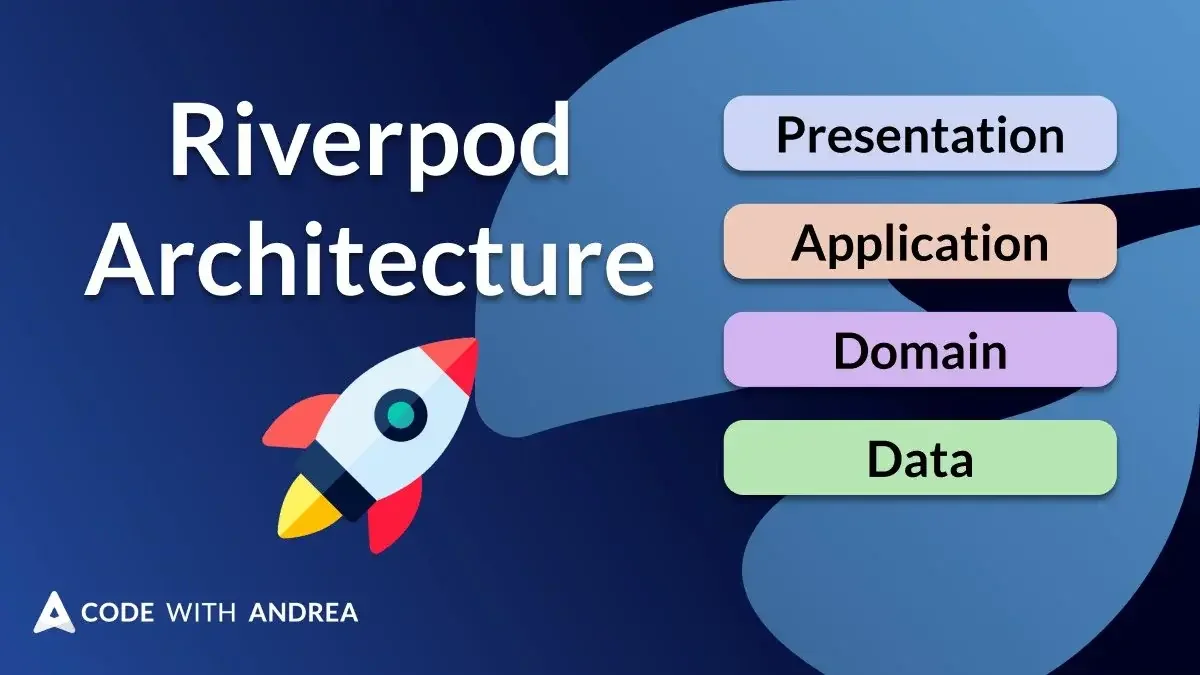
Looking at Andrea's article Flutter App Architecture with Riverpod: An Introduction, each feature has folders called presentation, application, domain, and data. To understand why this folder structure exists, you first need to understand the app architecture. This is called Feature-First Architecture.
App Architecture#
This architecture feels like Andrea mixed and matched from several architectures, but since Flutter doesn't have an officially established architecture, I'm going to try using this one.
feature#
The definition of a feature varies by organization, but it can be seen as a single function or domain area.
Feature folders are created at lib/src/features.
lib/src/features/feature1..100 (should be renamed to specific names)
Let's assume lib/src/features/feature1 is auth (authentication).
For example, the lib/src/features/auth folder has presentation, application, domain, and data folders.
Example of what can go in the features folder:
‣ lib
	‣ src
		‣ features
			‣ account
			‣ admin
			‣ checkout
			‣ leave_review_page
			‣ orders_list
			‣ product_page
			‣ products_list
			‣ shopping_cart
			‣ sign_in
presentation#
Similar concepts to presentation = pages, views, screens, ui, widgets
Handles code related to the user interface (UI). Renders UI components based on state.
Implement all UI elements needed for authentication — login screen, signup screen, password change screen, etc. — here.
UI code communicates with and is updated by other layers through Riverpod Providers using state variables.
Example of what can go in the presentation folder:
# lib/src/features/entries folder example
‣ entries
	‣ presentation
		‣ entry_screen
			‣ entry_screen.dart
			‣ entry_screen_controller.dart
			‣ entry_screen_controller.g.dart
		‣ entries_screen.dart
Services are injected into Controllers. They typically use AsyncValue.
Similar concepts to controller = state providers, blocs, cubits
Alternatively, Controllers can be made as riverpod classes.
Controllers should not contain UI. And UI should not contain logic.
application#
Similar concepts to application = services, app logic
Handles business logic. Manages state.
Implement business rules for authentication features — login, signup, password change, etc. — here.
Business logic code communicates with and is updated by other layers through Riverpod Providers using use cases functions.
Example of what can go in the application folder:
# lib/src/features/entries folder example
‣ entries
	‣ application
		‣ entries_service.dart
		‣ entries_service.g.dart
Required repositories in a service are injected when the provider is created.
They're passed using ref.watch. Alternatively, you can just pass ref and keep calling ref.read in functions.
The Application Layer mediates everything.
- It doesn't concern itself with widget state management and updates -> That's the Controller's job
- Data parsing and serialization -> That's the Repository's job
domain#
The core layer that defines entities, domain models, business rules, etc.
Define concepts and models related to authentication here to raise the level of abstraction and improve reusability.
Responsible for transforming data that comes from the data layer.
Example of what can go in the domain folder:
# lib/src/features/entries folder example
‣ entries
	‣ domain
		‣ daily_jobs_details.dart
		‣ entries_list_tile_model.dart
		‣ entry.dart
		‣ entry_job.dart
data#
Handles data storage and loading by interacting with APIs.
Store and retrieve authentication-related data through local storage, APIs, networks, etc.
Data loading code communicates with and is updated by other layers through Riverpod Providers using repositories functions.
Whether to write to local or remote storage depends on the situation.
Example of what can go in the data folder:
# lib/src/features/entries folder example
‣ entries
	‣ data
		‣ entries_repository.dart
Other Folders#
The lib/src folder has various folders beyond features.
common_widgets#
A folder for defining commonly used widgets.
Implement buttons, text input fields, loading bars, and other widgets that are repeatedly used throughout the app to increase code reusability and maintain consistency.
Basically wrapping or combining Flutter's built-in widgets into new components.
constants#
A folder for defining various constants used in the app.
Store color codes, font styles, API addresses, version information, etc. here to improve readability and make change management easier.
Constant values affect the entire codebase when changed, so they should be managed carefully.
exceptions#
A folder for handling exceptions that occur during app execution.
Define error messages and recovery methods when exceptions occur to provide clear information to users and maintain stable app behavior.
localization#
A folder for managing strings to support the app in multiple languages.
Create and manage string resource files for each country or language to serve the app in the appropriate language.
routing#
A folder for managing navigation within the app.
Define navigation paths and implement navigation logic so users can naturally explore the app.
We use go_router combined with Riverpod in our project.
utils#
A folder for defining various utility functions useful for app development.
Mainly contains functions rather than widgets.
Full Folder Structure#
I've explained each section above. So the overall folder structure will look like this:
‣ lib
	‣ src
		‣ common_widgets
		‣ constants
		‣ exceptions
		‣ features
			‣ address
				‣ application
				‣ data
				‣ domain
				‣ presentation
			‣ authentication
			‣ cart
			‣ checkout
			‣ orders
			‣ products
			‣ reviews
		‣ localization
		‣ routing
		‣ utils
This structure isn't necessarily the definitive answer, but rather than just building randomly, I wanted to follow and learn from the folder structure of someone who's great at Flutter. If a better or easier architecture comes along, please let me know! I'm still learning as I apply things.
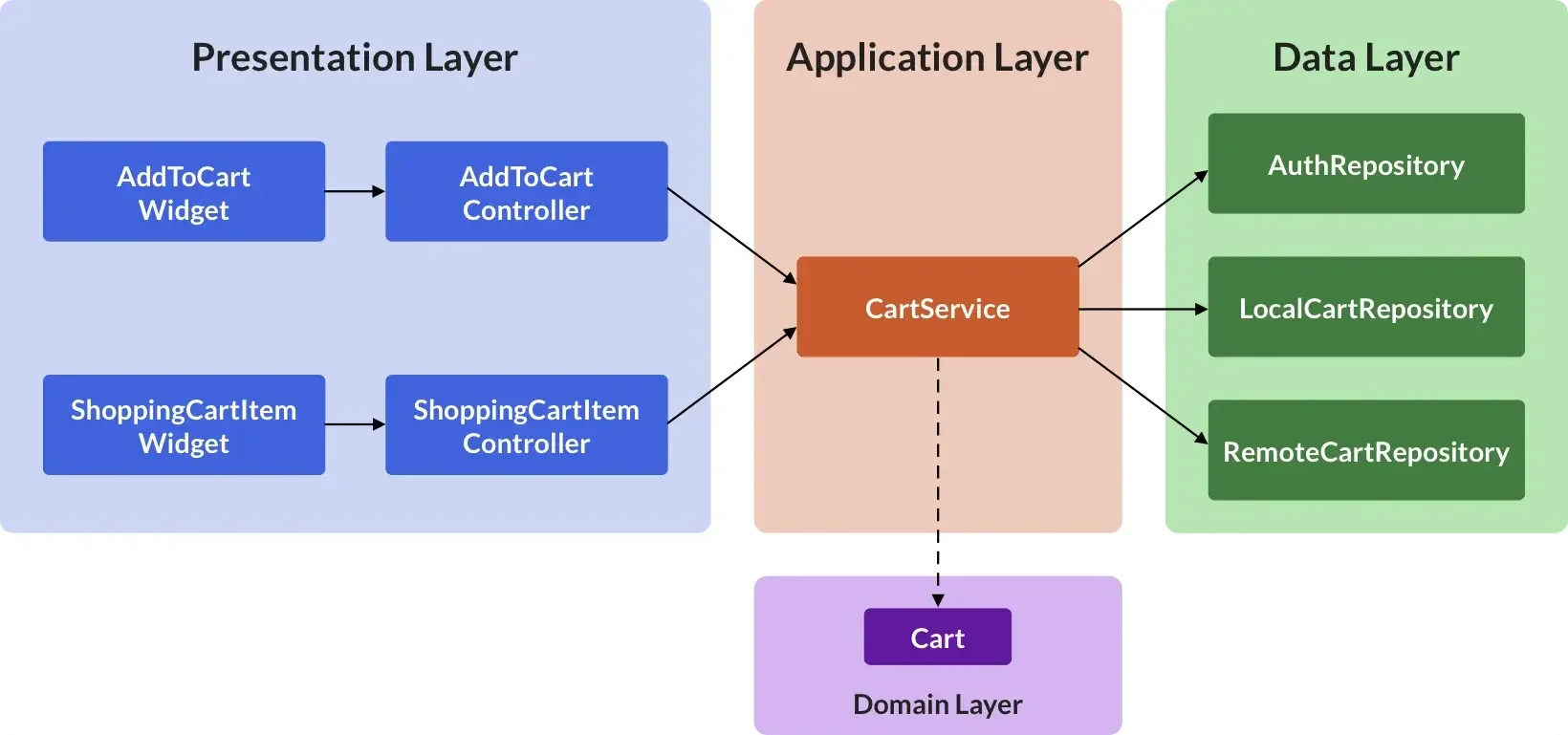
The app architecture flow looks like this. Everything changes based on user input and actions.
Notice the arrows are unidirectional:
- Presentation Layer -> Application Layer -> Data Layer
- Application Layer -> Domain Layer
This post is simply a compilation of scattered information organized together. Andrea's blog has many related articles.
Even if you read them all, the examples and essentials are behind paid courses, so after reading this post you'll probably need to learn from GPT or other GitHub code. Still, I've organized the links for those who want to read them:
- Flutter App Architecture with Riverpod: An Introduction
- Flutter Project Structure: Feature-first or Layer-first?
- Flutter App Architecture: The Repository Pattern
- Flutter App Architecture: The Domain Model
- Flutter App Architecture: The Presentation Layer
- Flutter App Architecture: The Application Layer
I didn't include any code in this post. While I've organized everything in writing, I'm not actually proficient with it yet, so I need to try applying it in a real project first.
Here's an example to help you decide whether certain logic belongs in the Presentation layer or the Application layer. Imagine your team decided to stop using Flutter (no GUI support) and switch to a CLI. In this case, ideally all changes should happen in the UI layer, and the Application layer shouldn't change at all.
Since we use Widgets and Controllers in Presentation, we should be able to build a CLI program using only the Application layer and Data layer.
The wisdom of the wise, and the experience of ages, may be preserved by quotation.
— Isaac D'Israeli