
2026 is a pretty good time to start building something on your own. A few years ago, launching a single app meant you had to know frontend, backend, and infrastructure. Now tools fill in a lot of those gaps for you.
But the nature of the question has shifted. "How do I build this?" now matters less than what you decide before you start. The better the tools get, the more the foundation you set early decides the outcome. So if you're starting solo, let me lay out what's worth setting up, in order.
AI lets one person work like a team#
The biggest change in solo development in 2026 is, without question, AI coding tools. Claude Code, Cursor, GitHub Copilot — they've gone from "nice to have" to your default working environment.
So-called "vibe coding," where you describe something in words and code comes out, has gone mainstream. AI now sits across the whole development flow, not just writing code.
- Design — generate UI drafts with tools like v0
- Testing — fill out test cases and coverage
- Documentation — auto-organize READMEs and API docs
- Code review — PR summaries and change explanations
The cost math is worth knowing too. People say spending around $100 a month on AI tools can replace the effect of a single contractor (thousands a month). One person can now cover several roles.
It's not all rosy, though. More people are hitting the "80% wall" — building 90% fast, then getting stuck on the rest. They burn expensive AI credits debugging in circles, or discover security holes late. So the theme of 2026 is shifting from speed to sustainability.
AI multiplies your hands, not your judgment. How to frame the foundation is still yours to decide.
Decide the "environment" before the framework#
That first piece of judgment is what to build with, and how. I'm centering on Flutter. Write once and reach Android, iOS, web, and desktop — that cross-platform fit works well for solo development.
But what really matters isn't the framework choice; it's the project environment. Company or solo, there are things you should set up regardless of framework.
- Monorepo — manage apps, packages, and shared code in one repository
- Internationalization (i18n) — separate your strings from the start and adding languages later is easy
- Flavors — split dev / staging / prod as build variants
- Design system — define colors, typography, and components in one place
- Architecture / collaboration / testing — the foundation that keeps code from collapsing as it grows
Of these, dev rules and architecture matter enough that I'll unpack them separately just ahead. Skip this because you're solo, and it all comes back as debt when a teammate joins or the project grows. Think of it as an environment for your future self.
Setting dev rules early makes life easier#
The partner to environment is dev rules. There's more to decide outside of coding than you'd think.
- Code review — even solo, the habit of opening a PR and self-reviewing
- Style rules — naming, folder structure, file-splitting criteria
- Preprocessor (formatter) — auto-format on save
- Linting — catch mistakes and anti-patterns before commit
These rules matter even more in the AI era. The clearer your rules, the more consistently AI follows their grain. They're a contract that both you and the AI read.
State management and architecture — how far should you go?#
From here on, it's a more hands-on, next-step kind of topic. If you're just starting, skim it and come back later — that's fine.
When you put architecture into a Flutter screen, there's a recurring dilemma: where to use Riverpod's ref.
My first thought was this: if I push the controller-calling ref.read and the state-watching ref.watch into the screen, the rest of the UI can stay pure, with no dependency on state. Then child widgets only need data and callbacks injected.
The problem is that this creates prop drilling. You have to keep passing the data and functions you received in the screen down through intermediate widgets to the deep ones.
Here Riverpod's design philosophy gives an answer. The official docs describe ref.watch as something like an InheritedWidget. Just like Theme.of(context), any widget anywhere in the tree can subscribe to a provider directly.
So the answer isn't "push everything into the screen" — it's balance.
- The screen handles the controller calls that orchestrate flow and the larger state subscriptions
- A leaf widget that actually needs a specific piece of state shouldn't receive it via props — make that widget a
ConsumerWidgetand let itref.watchthe provider directly - If frequent rebuilds worry you, subscribe to only the slice you need with
ref.select
This makes the drilling through intermediate widgets disappear, because the widget that needs the state grabs it directly. Apply "pure UI" only to small, truly presentational components (buttons, cards), and make the places that need state into consumers — that's cleaner.
Is event-driven architecture different from clean architecture?#
Short answer: they're talking about different layers. They're not competitors; you can use them together.
- Clean architecture is about structure. You separate layers like entities, use cases, and UI, and keep dependencies always pointing inward (toward the domain).
- Event-driven architecture is about flow. Instead of components calling each other directly, they exchange events (messages) and stay loosely coupled.
So "a clean architecture that communicates through events" is entirely possible. One decides how you stack the code; the other decides how the parts talk to each other.
Start with the lightest server and infra#
Once you've tidied the inside of the code, it's time to look at the outside it runs on. The most common mistake when starting solo is laying down grand infrastructure from day one. You can defer it until you actually need it.
Bring the server up in stages:
- Firebase (BaaS) — fastest for the market-validation stage. Auth, DB, and storage in a few lines of code
- NestJS — around the time Firebase costs start to hurt, as a balance point between cost and development ease
- Spring + Kotlin — when costs grow further and you need MSA (microservices)
The DB is similar. Open-source PostgreSQL alone is plenty as a base, and you can manage schema-change history with a tool like Liquibase. Things like Redis, MongoDB, or Elasticsearch can be added the moment you truly need them — no rush.
One thing worth setting up from the start is containers. Wrapping your environment with Docker lets you keep development and production identical, which greatly reduces "it worked on my machine" problems.
When you do scale the infra, use the CNCF Landscape guide as a compass. It organizes the proven tools of the container ecosystem, so you can choose without getting swept up in buzzwords.
There are stacks outside the code, too#
Going solo ultimately means wearing more hats than just developer. Money, marketing, customer support — they all become yours. And each of these has a tech stack of its own.
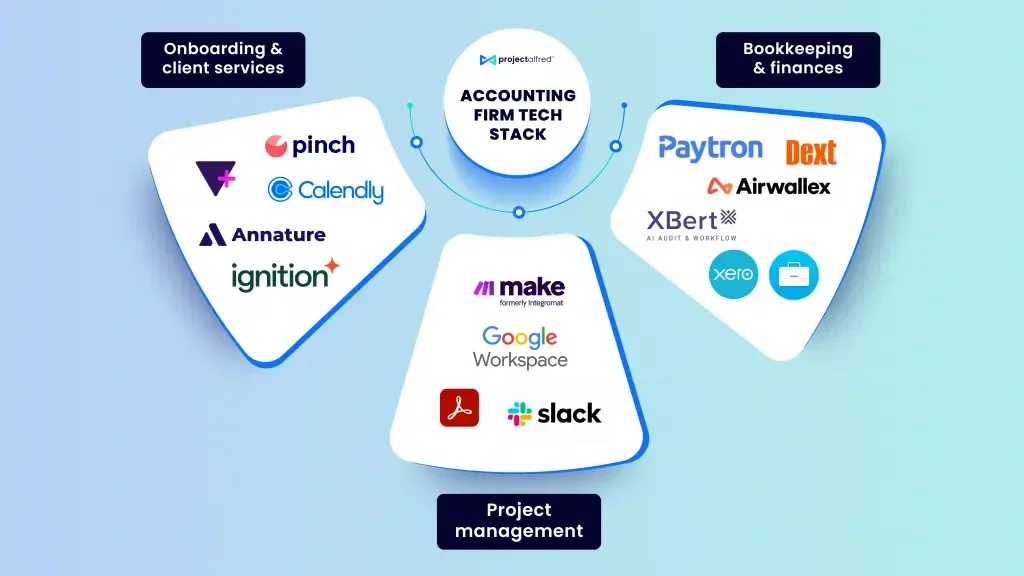
Take accounting alone, and the tools already branch out like this.
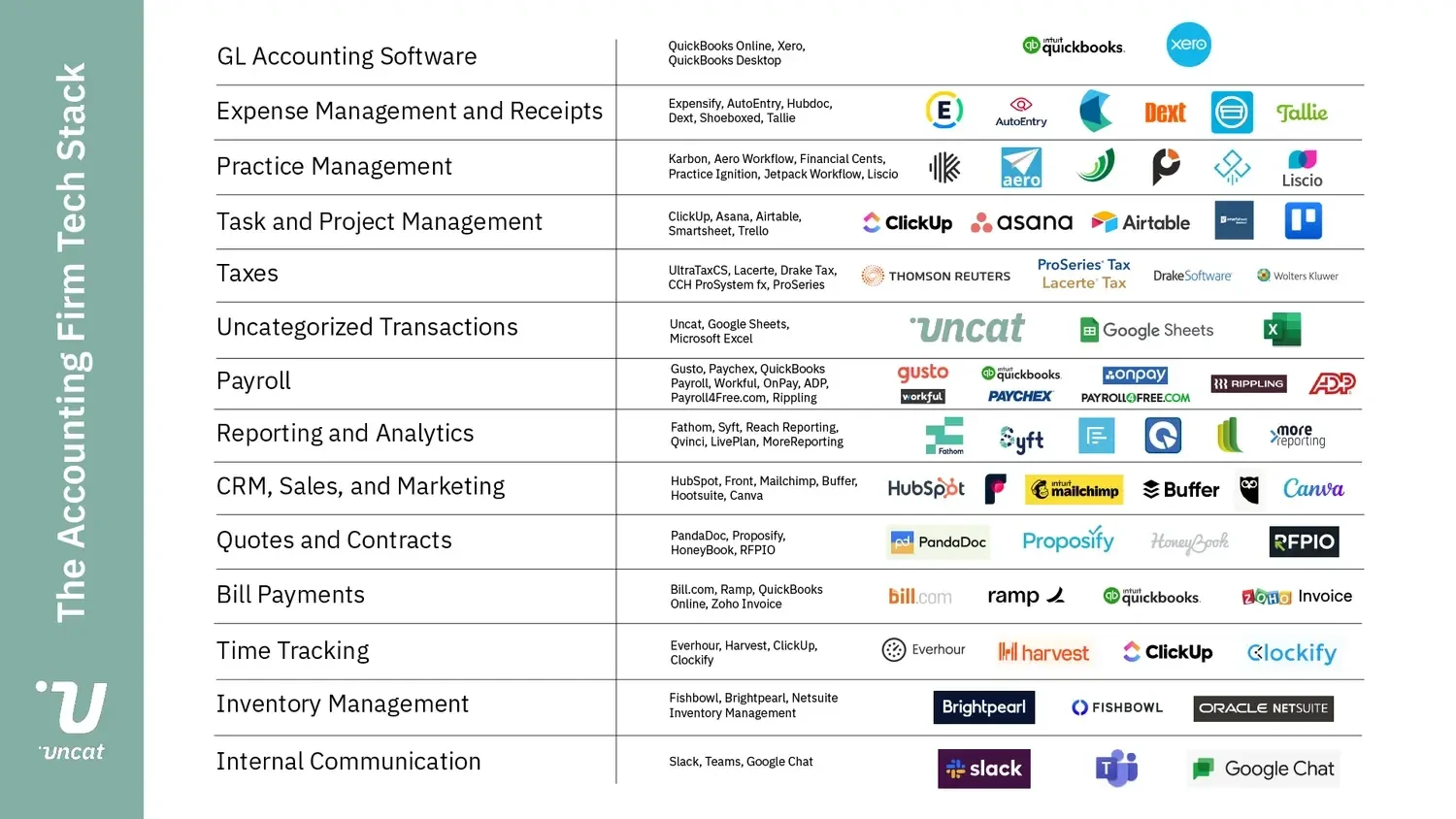
View the same stack grouped by function — onboarding, finances, project management — and it looks like this.
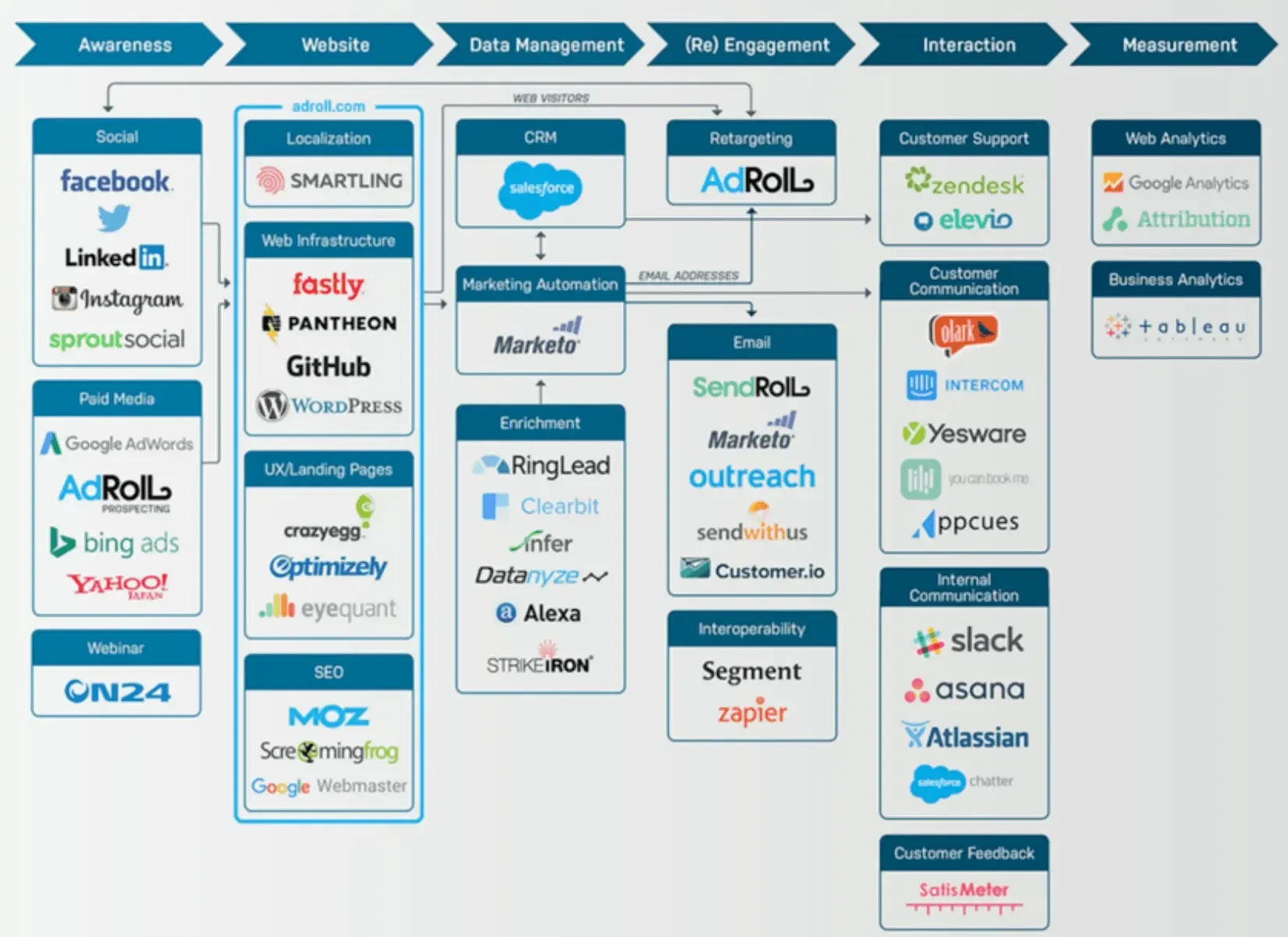
Marketing has a different feel. Rather than a list of tools, it moves as a flow — starting at awareness and moving through website, data management, re-engagement, and interaction to measurement.
Split the roles into marketing, sales, and service and lay them out in one view, and you get something like this — each builds a different set of tools.
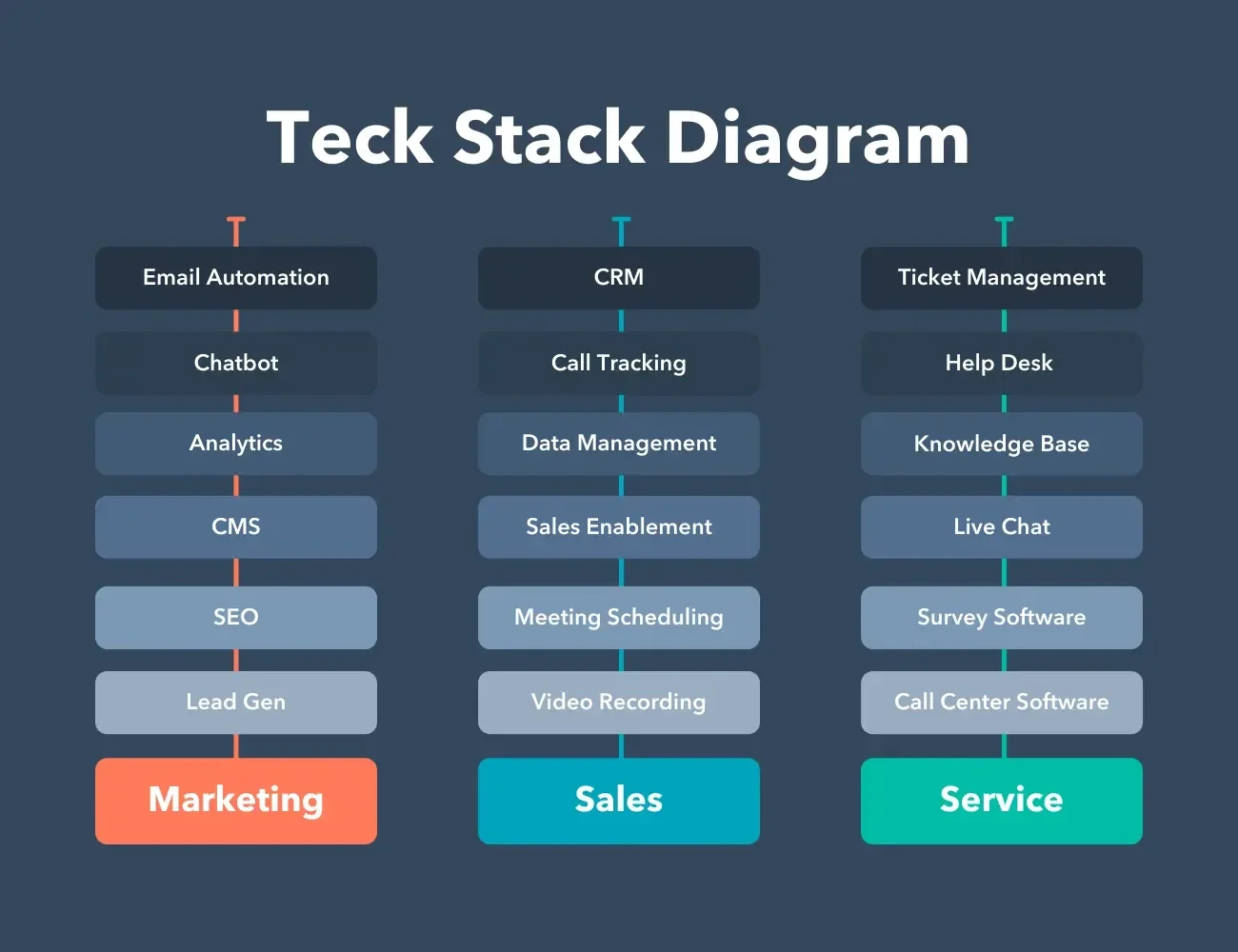
Take two things from this. First, maps like these have already been drawn well by someone — you can borrow them instead of building your own. Second, however grand the picture looks, you don't have to fill it all in from the start. Just like the dev stack, pick the lightest tool for the one thing you're stuck on right now.
You can find more examples of stacks across roles in articles like Tech Stack: Definition + 9 Examples.
So, if you're going solo in 2026#
To sum up:
- Make AI tools your default environment, but keep the judgment yours
- Decide the environment (monorepo, i18n, flavors, design system, testing) before the framework
- Lock in dev rules early as a contract (both you and the AI read it)
- Keep architecture balanced — let widgets that need state consume it directly
- Start server and infra with the lightest option, and grow when needed
- Roles outside the code (accounting, marketing, and so on) are stacks too — borrow proven maps instead of drawing your own
As tools have gotten better, there's so much more one person can build. Which makes it even more an era where what you decide to set up first shapes the outcome. Rather than envying a grand stack, the best start is picking the lightest option that fits the one screen you're building today.
If we are not fully ourselves, truly in the present moment, we miss everything.
— Thich Nhat Hanh