How It Started#
When writing blog posts about Great Minds, I take a lot of screenshots. These images usually exceeded 3MB each. It wasn't too slow when posts had only a few images, but with each new post, I noticed the page load getting progressively slower.
So I figured converting the existing images to webp would reduce their size and improve my Lighthouse score, and today I got around to fixing it.
The Original Approach#
I use Obsidian to write blog posts. If you look at my blog repository get6.github.io, you'll see a .obsidian folder inside the blog directory. On my PC, I open that folder in Obsidian and use it as a vault.
I configured Obsidian so that all blog post images are saved to the blog/assets folder.
But here's the catch — Next.js can only reference images from the public folder at the project root.
To copy images to public, I added the following script to package.json:
"scripts": {
	// ...omitted
	"copy-dir": "mkdir -p public/blog/assets && cp -r blog/assets/* public/blog/assets/",
	"predev": "yarn copy-dir",
	"prebuild": "yarn copy-dir",
}
Whether I ran yarn dev or yarn build, copy-dir would run first to copy the images.
(Both predev and prebuild worked fine locally, but they didn't work in GitHub Actions. If anyone knows why, please let me know...)
Since the copied location differs from the path displayed in Obsidian, the image paths inside markdown files needed to be adjusted for the Next.js environment. I solved this by adding a custom function to the remarkPlugins in contentlayer.config.ts.
/**
 * @type {import('unified').Plugin<[], Root>}
 * @param {string} options.root
 */
const remarkSourceRedirect =
  (options?: void | undefined) => async (tree: any, file: any) => {
    const images: any[] = []
    visit(tree, 'paragraph', (node) => {
      const image = node.children.find((child: any) => child.type === 'image')
      if (image) {
          image.url = `/blog/${image.url}`
        }
      }
    })
  }
Then I also needed to modify .github/workflows/next.yml so everything would display correctly on GitHub Pages.
	# Add to jobs.build.steps
	# ...omitted
	# Add this in the middle. I placed it before the next build step
	- name: Copy blog images to public folder
	  run: mkdir -p ${{ github.workspace }}/public/blog/assets && cp -r ${{ github.workspace }}/blog/assets/* ${{ github.workspace }}/public/blog/assets/
This approach touched several places to make it work, but if you look at the Artifacts section in the GitHub Action results for Add post, you can see it was 105MB. If you download it, you'll see that most of that was image size. Beyond just the file size, the UX was poor — certain pages took way too long to load. So I decided to change things up.
The Improved Approach#
I used sharp to reduce image sizes. I believe Next.js also uses sharp internally. I figured it would be more convenient to read files, reduce their size, and create files at a different path in a Node environment instead of using raw Linux commands.
I couldn't find a better approach — I didn't find a function provided during the Next.js build step, so I went with this Node-based solution.
First, I created a file called scripts/copy-image.ts:
import fs from 'fs'
import path from 'path'
import sharp from 'sharp'

const copyImage = async (src: string, dest: string) => {
  const image = sharp(src)

  const resizedImage = image.webp()
  await resizedImage.toFile(dest)
}

const srcDir = path.resolve(__dirname, '..', 'blog', 'assets')
const destDir = path.resolve(__dirname, '..', 'public', 'blog', 'assets')

if (!fs.existsSync(destDir)) {
  fs.mkdirSync(destDir, { recursive: true })
}

fs.readdirSync(srcDir).forEach(async (file) => {
  const imagePath = path.resolve(srcDir, file)
  const stat = fs.statSync(imagePath)
  if (stat.isFile() && /\.(PNG|JPG|JPEG|png|jpg|jpeg)$/.test(file)) {
    const copyPath = path
      .resolve(destDir, file)
      .replace(/\.(PNG|JPG|JPEG|png|jpg|jpeg)$/, '.webp')
    await copyImage(imagePath, copyPath)
  }
})
The __dirname path is inside the scripts folder, so I added .. to navigate to the project root. When I created the ts file and ran it with tsc, a js file was created in the same directory. I wanted it to just execute without generating files, so I installed ts-node (yarn add -D ts-node).
The existing scripts just need to be changed like this:
"scripts": {
	// ...omitted
	"copy-dir": "ts-node scripts/copy-image.ts",
	"predev": "yarn copy-dir",
	"prebuild": "yarn copy-dir",
}
The remarkSourceRedirect function also needs to be updated. Since I'm creating files as webp, the original extensions are only used in Obsidian, and webp files are used by Next.js.
// Changed just this part!
image.url = `/blog/${image.url}`

// Changed to this:
image.url = `/blog/${image.url.replace(/\.(PNG|JPG|JPEG|png|jpg|jpeg)$/, '.webp')}`
Up to this point, you can verify everything works locally.
Finally, update .github/workflows/next.yml for post-deployment as well. Since we're using several libraries including ts-node and sharp, the image copy must happen after dependency installation.
	# Add to jobs.build.steps
	# ...omitted
	- name: Install dependencies
	  run: ${{ steps.detect-package-manager.outputs.manager }} ${{ steps.detect-package-manager.outputs.command }}
	- name: Copy blog images to public folder
	  run: ${{ steps.detect-package-manager.outputs.runner }} copy-dir
	- name: Build with Next.js
	  run: ${{ steps.detect-package-manager.outputs.runner }} build
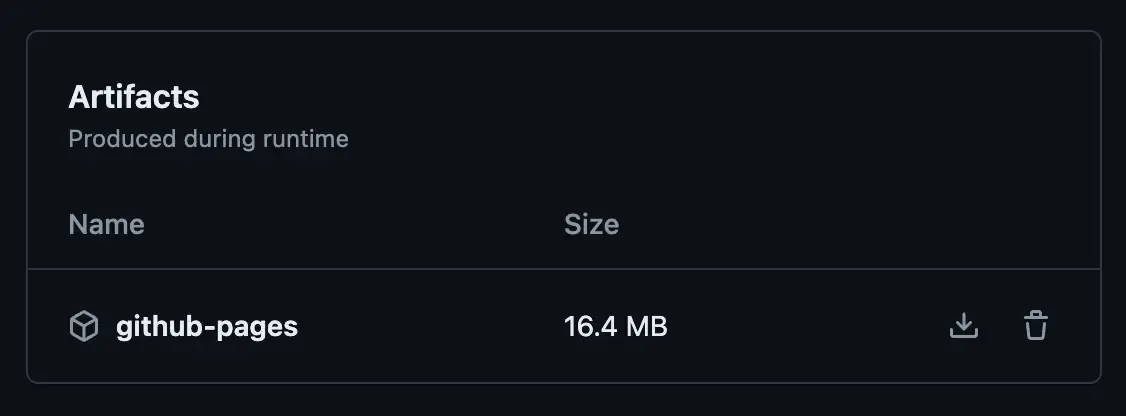
With this setup, the compressed artifact comes out to just 16MB!
How I Previously Solved the Image Problem#
This was before the improvement, but before copying images, I used to grab the image path from the markdown file, convert the image to base64, and embed it like data:image/webp;base64,UklGRowzAABX. This way, even without putting images in the public folder, the markdown would just have a long text string but the image would display on the web. However, as posts accumulated, this approach became problematic too. Before converting to webp to reduce sizes, posts with multiple images over 3MB each would take several seconds to transition to the page after clicking the button. That's what eventually led me to think about physically moving the images instead.
There was another issue too — when images were converted to base64, they wouldn't show up when sharing links. This could also lower SEO scores.
Reason and free inquiry are the only effectual agents against error.
— Thomas Jefferson